All posts by confluoadmin

big data

Myth Busted!! Small Data is motivating the Internet of Things (IoT) rather than Big Data

Now days, When people talk about the Internet of Things (IoT) they incline to think about big data technologies like Cloudera, Hadoop where petabyte size datasets are analyzed and stored for both unknown and known patterns. What many people don’t understand is that many IoT use cases only require small datasets. Now the question arise, What is small data, you ask? Small data is a dataset that contains very specific attributes. Small data is used to determine current states and conditions or may be generated by analyzing larger data sets. When we talk about smart devices being deployed on valves, on wind turbines, small packages and pipes, or attached to drones, we are talking about collecting small datasets. Small data tell us about temperature, location, wetness, pressure, vibration, or even whether an item has been opened or not. Sensors give us small datasets in real time that we ingest into big data sets which provide a historical view.

So why is small data significant? Small data can trigger events based on what is happening now. Those events can be merged with behavioral or trending information derived from machine learning algorithms run against big data datasets. Here are some examples:

Examples of Small and Big Data
A wind turbine has a variety of sensors mounted on it to govern vibration, velocity, wind direction, temperature and other applicable attributes. The turbine’s blades can be programmed to inevitably adjust to varying wind conditions based on the information rapidly provided by small data. These small data sets are also gulped into a large data creek where machine-learning algorithms begin to comprehend patterns. These configurations can reveal performance of certain mechanisms based on their historical maintenance record, like how wind and weather conditions effect wear and tear on various components, and what the life expectancy is of a particular part.

Another example is the use of smart labels on medicine bottles. Small data can be used to determine where the medicine is located, its remaining shelf life, if the seal of the bottle has been broken, and the current temperature conditions in an effort to prevent spoilage. Big data can be used to look at this information over time to examine root cause analysis of why drugs are expiring or spoiling. Is it due to a certain shipping company or a certain retailer? Are there reoccurring patterns that can point to problems in the supply chain that can help determine how to minimize these events?

Big-Data: Do You Need Big or Small Data?
Despite what people say, big data is not a prerequisite for all IoT use cases. In many instances, knowing the current state of a handful of attributes is all that is required to trigger a desired event. Are the containers in the refrigerated truck at the optimal temperature? Are the patient’s blood sugar levels too high? Is the valve leaking?

Does the soil have the right mixture of nutrients? Optimizing these business procedures can save companies millions of dollars through the analysis of comparatively small datasets. Small data knows what a tracked object is doing. If you want to understand why the object is doing that, then big data is what you seek. So, the next time someone tells you they are embarking on an IoT initiative, don’t assume that they are also embarking on a big data project.

business agility

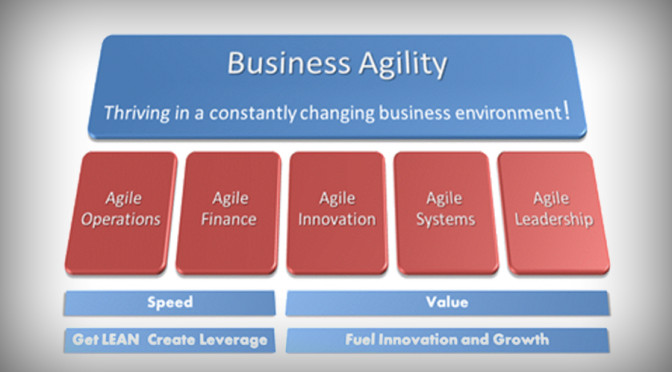
Business agility enhanced by cloud computing, what it really defines

Is cloud computing finally an authentic business strategy, or is it an IT optimization strategy? It might well be, a latest survey suggests. However, this new second phase of cloud means things are going to be harder to measure, conceptualize and design in the big picture.

Business agility has become the key advantage being delivered by cloud, says a new survey by Harvard Business Review Analytic Services of 527 HBR readers in large and mid-size organizations finds. The study was underwritten by Verizon Enterprise Solutions.

Business agility leads the list of drivers for adopting cloud computing, with nearly a third of respondents (32 percent) saying it was their primary reason for pursuing cloud. This was followed by increased innovation (14 percent), lower costs (14 percent), and the ability to scale up and down in response to variations in business demand (13 percent).

Defining “business agility” is where things get challenging. In the first phase of cloud computing, relative success could be measured on the basis of cost savings. Such calculations are based on hard, obvious metrics: Before cloud, the enterprise spent $100,000 on on-premises servers and software licenses and equipment every year, along with $200,000 of staff time (hypothetically speaking). After cloud, it spends $50,000 on subscription-based services and $150,000 of associated staff time.

Now consider how you would measure cloud’s impact on business agility. Business agility before cloud was… ugh. After cloud, things are, well, snappier, faster, more responsive.

Wikipedia seems to be having problems with defining “business agility,” with its existing definition having “multiple issues.” For the record, the site’s current definition of business agility starts off as “the ability of a business to adapt rapidly and cost efficiently in response to changes in the business environment.” Again, hard to measure. Business agility is one of those amorphous, ill-defined states that could mean any number of things. It means more profitability, faster time to market, greater ability to spin up new programs, create new products, hire new people, retain people — pick any. What’s important is not only speed, but conducting the right things.

The HBR-Verizon survey report doesn’t define agility head-on, but it delivers meaningful clues to the outcomes that agility provides: such as ability to enter new markets, reduce complexity, increase employee efficiency, and, yes, decreases costs. The survey discovers, for example, those enterprises more progressive in their cloud deployments, are more likely than their less-advanced counterparts to have entered a new market in the past three years (49 percent) or to have been part of a merger or acquisition (49 percent).

In addition, almost three-quarters of executives say cloud will reduce business complexity (24 percent significantly and 47 percent somewhat). In addition, 66 percent suggest cloud computing will reduce complexity in their company’s IT operations. Another 61 percent suggest it will increase employee productivity and 53 percent say it will increase responsiveness to customers (53 percent).

Benefits already seen from current cloud deployments include the simplification of internal operations (37 percent); better delivery of internal resources (33 percent); and new ways for employees to work, connect, and collaborate (31 percent). Also on the list of cloud advantage realized are faster rollout of new business initiatives to exploit new opportunities (at 23 percent) and improved ability to acquire, share, analyze, and act on data (23 percent).

SaaS Companies: Is it Investor’s First Love??

The estimation of SaaS organizations is much more than software product sales organizations. Public SaaS organizations have a Revenue median ratio to Enterprise of 6.6x compared with 3.0x for software organizations according to Software Equity Group. Do Investors adore SaaS companies as they have higher valuations or do SaaS organizations have higher valuations as Investors loves them?

Well actually, this isn’t irrational buoyance. There are solid reasons why SaaS organizations have high valuations. The valuations are a consequence of the superior SaaS business model.

Data from Saugatuck Technology, 2014

*Data from Saugatuck Technology, 2014

The market environment has changed; customers want to lease rather than buy – CAPEX, and not OPEX. They want the suppleness to try SaaS and then leave them, expand them, or leave them – business agility supports SaaS rather than software purchases.

SaaS based organizations take multiple forms. Software as a Service (SaaS) organizations such as Salesforce, and Infrastructure as a Service (IaaS) organizations such as Amazon have seen the highest growth, but there are multiple other SaaS industries like telecom, Media like Netflix, Healthcare, and also the “wine of the month club.” Organizations with recurring subscription revenue are seen favorably by the markets.

SaaS offer convenience, flexibility, and less lock-in for clienteles. SaaS need less time and effort for implementation – decreasing both the cost and the time to value (TTV) for clienteles.
Clienteles see the benefits of SaaS generating market demand, which powers the accelerated growth of SaaS organizations.

Legacy product retailers have a benefit in their resources, partners and clienteles. It requires a disruptive offering to seize these clienteles from the stakeholders – a SaaS offering can offer that disruption with latest capabilities, delivery mechanisms and pricing models with greater flexibility for clienteles.

SaaS organizations structurally can deliver more rapid advances than product retailers. Latest capabilities can be provided in SaaS update with their customers profiting from the most recent innovations rapidly. The capability to offer new benefits faster to customers provides a competitive advantage to SaaS organizations.

These benefits allow SaaS organizations to enter markets that were dominated by companies with a product sale mentality and contend successfully. Organizations without a SaaS offering won’t get a seat at the table – SaaS is usually a prerequisite in new projects.

Investors looks for organizations that disrupt the status quo.
Software equity group, 2014

*Software equity group, 2014

And investors adore growth. The median growth for SaaS organizations is over three times that of Software product organizations.

Steady growth in revenue is followed by a growth in organization’s value. SaaS is a disruptive paradigm which permits companies with a SaaS offering to grow briskly at the cost of the incumbents.

Investors understands that SaaS organizations are gaining market acceptance, and are preferred as well, in most industries (such as health care) and applications (such as CRM). Markets once not thought viable for SaaS subscriptions (such as ERP) are now witnessing high and growing demand. Investors wants to recognize the new leaders in these emerging organizations serving these new markets for their possibly high investment returns.

While initial SaaS revenues are less, compared to product sales, over the life of the client, the recurring SaaS revenue value is more than product sales. This higher customer value through a long term recurring revenue stream eventually leads to greater revenue for the organization.

Investors value organizations that are growing rapidly. High SaaS revenue growth is a resultant of expansion and maintenance of the customer base along with revenue from new clienteles. Software product organizations must add more clienteles each quarter to grow, while SaaS organizations just add customers on-top of the present base.

Investors see the rapid growth of SaaS organization’s valuations. For example, in the last five years, Salesforce, the principal cap SaaS stock’s share price increase has been over double than that of Microsoft, Oracle, or SAP, the three software organization with the maximum market value.

graph-2

SaaS companies benefit from Moore’s law – their Cost of Service for the SaaS companies is decreasing year after year as public cloud costs fall. Amazon, Microsoft Azure, and Google have reduced the cost of their compute instances by 36% and their storage by 65% in 2014. Those SaaS companies that host their product in the public cloud saw their costs drop dramatically. Those who purchased servers did not.

The chart on the right shows the areas where aggressive competition have reduced hosting costs of SaaS companies in 2013.

Investors now understand how to assess SaaS finances beyond simple Income Statements. Investors look beyond the sold product sale based financial analysis to assess the SaaS vendor’s financial strength. They look at the value of the future revenue stream not included in the financial statements, not just the last quarter’s profit and loss, to assess the financial prospects of SaaS companies. The long term profit potential for fast growing SaaS companies is now well understood with more sophisticated analysis of the increases in the SaaS companies’ Customer Lifetime Value and cash flow.

Investors also highly value the long term revenue stability that a SaaS revenue stream provides.

SaaS companies have lower revenues than product sales companies marketing to the same companies with comparable solutions until the recurring revenue stream builds up to exceed the value of discrete sales. Product companies that shift to SaaS have reduced revenue and cash flows until sufficient SaaS revenue builds up to exceed that of their product sales. But investors now understand this and rewards the transition to SaaS even with a short term drop in profits and revenues.

Adobe transitioned its Creative Cloud Suite to a SaaS model in May of 2013. Despite an 8% decline of overall revenue, but with a near doubling of SaaS revenue, Adobe stock soared 55% in 2013.

reduce-toc-of-sap

Reduce TCO of SAP Deployments and Upgrades by an integrated approach

Throughout the course of any SAP implementation or upgrade, enterprises should use a business technology optimization (BTO) method to achieve reduce total cost of ownership (TCO) and higher-quality applications. Mercury for SAP Solutions: a pre-packaged solution comprised of integrated software, services, and best practices.

In the current scenario, IT organizations are under growing pressure to cut costs and surge revenue — while diminishing risk and implementing new applications to meet business initiatives. Increasing the challenge is the growth in highly complex and visible Web-based applications, which can possibly upset a previously steady technology infrastructure. Integrated offerings like Mercury for SAP Solutions demonstrate cost savings by helping customers prevent downtime, drive cost out of their existing SAP and improve quality. With over 1400 customers have efficaciously used Mercury for SAP Solutions to deploy, upgrade, and maintain their SAP systems — and successfully reduce total cost of ownership (TCO).

Mercury for SAP Solutions includes several integrated offerings called Mercury Optimization Centers — pre-packaged business technology optimization (BTO) solutions that maximize IT strategy, application readiness, system performance, business availability, and problem resolution. These Centers enable an organization to apply integrated models across its IT organization and to optimize critical IT activities. They include: Resolution Center, Business Availability Center, IT Governance Center, Quality Center and Performance Center. The products encompassing the Centers are also available individually. For example, organizations can use Mercury products to solve a specific departmental issue or improve a particular process or project.

Automating tests and quality assurance
Quality Center improves application superiority by automating and managing the entire testing and quality assurance process, including functional testing of the business process workflow. It empowers testing SAP applications the same way end users interact with them in real life. This Center decreases time to test by an average of 60 percent. The QuickTest Professional 6.5 tool, part of the Quality Center, has been certified by SAP for integration with the SAP extended Computer Aided Test Tool. Using the SAP NetWeaver integration and application platform and QuickTest Professional, customers can run quality tests in environments that span beyond Windows and SAP solution-based environments, including advanced, multi-platform, highly-integrated composite, legacy, and proprietary enterprise applications.

Two core Quality Center products are tools Quality Management (formerly TestDirector) and WinRunner. WinRunner captures and reruns user exchanges automatically to identify flaws and certifies that business processes in SAP applications work impeccably the first time. To create a test, WinRunner simply records a typical business process by emulating user actions, such as ordering an item or opening a vendor account. Next, testers can add checkpoints, which compare expected and actual outcomes from the test run. WinRunner offers a variety of checkpoints, including test, GUI, bitmap, and web links. It can also verify database values to ensure transaction accuracy and database integrity, highlighting records that have been updated, modified, deleted, and inserted. With WinRunner, organizations gain several advantages, including reduced testing time by automating repetitive tasks. Support for diverse environments enables organizations to test any component mix or industry solution.

By conjoining requirements, planning, execution, and defect tracking, the Quality Management tool shapes and controls the testing process to regulate whether SAP applications are ready for deployment. Quality Management quickly translates a business process analysis into a comprehensive framework of tests that includes manual and automated functional and regression tests, as well as load test scenarios. Through its open architecture, Quality Management also seamlessly integrates with leading application lifecycle tools — from configuration management to helpdesk.

AWS: Is it as great as Amazon is claiming, yes, maybe, maybe not!!

Having been gathered information from offices using Amazon Web Services (AWS), we have come to know a lot about the reason it is being celebrated in the corporate circles nowadays. However, with this knowledge gathering that we have done for some time now, we fairly have an idea about what’s not so good about it. What we have managed to do is come up with a high-availability, high- performance system, which is slightly different than what Amazon advices.

Let’s look at two related things:
1. For folks who are trying to get their hands on AWS, or want to know more about it. We thought we will share some benefits and challenges having encountered them ourselves.

2. For those who are already using AWS, we know that the priority is always the uptime. Therefore, we thought of sharing some best practices for running a high-performance service.

It would be fair, and not over-enthusiastic to say that AWS has bought a revolution in running a technology start up in terms of sheer economics. Nobody notices how many companies are using Amazon’s Elastic Compute Cloud (EC2) somewhere in their heap until it has an outage, and unexpectedly it seems like half the Internet goes away. But it’s not like Amazon managed to do it by fluke: they have an awe-inspiring product. Everyone uses AWS because EC2 has drastically simplified running software, by enormously lowering the amount you need to know about hardware in order to do so, and the amount of moolah you need to get started.

EC2 is a modern method of running software
The primary and the most essential thing to know about EC2 is that it is not “just” a virtualized hosting service. Another way of thinking about it is like employing a network administrator and a fractional system: instead of retaining one very expensive resource to do a whole lot of automation, you choose to pay a little bit more for every box owned by you, and you have whole classes of problems distracted away. Network topology and power, vendor differences and hardware costs, network storage systems — are factors one had to give a thought about back in 2000-2004. However, with AWS you do not have to pay a heed about it, or at least not till you become a mammoth.

By far, the biggest reason and advantage of using EC2 is its suppleness. We can swirl up a new box very, very rapidly — about 5 minutes from thinking “I think I need some hardware” to logging for the first time, and being ready to go.

This allows us do some things that just a few years ago would have been crazy, for example:
• we can incorporate major advancements on new hardware. When we have a large upgrade, we spin up completely new hardware and make all the configs and dependencies right, then just prioritize it into our load balancer — reversing is as easy as resetting the load balancer, and moving forward with the new system means just shutting down the old boxes. Running double as much hardware as you require, but for just 24 hours, is simple and cheap.

• Our downtime plan for few non-critical systems, where possibly up to an hour of infrequent downtime is acceptable, to monitor the box, and if it faulters, make a new box and reestablish the system with backups.

• we can ramp up in response to event loads, comparatively than in advance of them: when your monitoring senses high load, you can spin up supplementary capacity, and it can be completed in time to handle the current load event — not the one after.

• we can not be anxious about pre-launch capacity calculations: we spin up what looks at a gut level to be sufficient hardware, launch, and then if we discover we’ve got it wrong, spin boxes up or down as required. This kind of repetition at the hardware level is one of the greatest component of AWS, and is only probable because they can provision (and de-provision) instances near-instantly.

But EC2 has some problems
While we admire EC2 and couldn’t have got where we are without it, it’s important to be honest that not everything is sunshine and roses. EC2 has serious performance and reliability limitations that it’s important to be aware of, and build into your planning.

First and foremost is their whole-zone failure pattern. AWS has multiple locations worldwide, known as “availability regions”. Within those regions, machines are divided into what is known as “availability zones”: these are physically co-located, but (in theory) isolated from each other in terms of networking, power, etc..

There’s a few important things we’ve learned about this region-zone pattern:
Virtual hardware doesn’t last as long as real hardware. Our average observed lifetime for a virtual machine on EC2 over the last 3 years has been about 200 days. After that, the chances of it being “retired” rise hugely. And Amazon’s “retirement” process is unpredictable: sometime they’ll notify you ten days in advance that a box is going to be shut down; sometimes the retirement notification email arrives 2 hours after the box has already failed. Rapidly-failing hardware is not too big a deal — it’s easy to spin up fresh hardware, after all — but it’s important to be aware of it, and invest in deployment automation early, to limit the amount of time you need to burn replacing boxes all the time.

You need to be in more than one zone, and redundant across zones. It’s been our experience that you are more likely to lose an entire zone than to lose an individual box. So when you’re planning failure scenarios, having a master and a slave in the same zone is as useless as having no slave at all — if you’ve lost the master, it’s probably because that zone is unavailable. And if your system has a single point of failure, your replacement plan cannot rely on being able to retrieve backups or configuration information from the “dead” box — if the zone is unavailable, you won’t be able to even see the box, far less retrieve data.

Multi-zone failures happen, so if you can afford it, go multi-region too. US-east, the most popular (because oldest and cheapest) AWS region, had region-wide failures in June 2012, in March 2012, and most spectacularly in April 2011, which was nicknamed cloudpocalypse. Our take on this — and we’re probably making no friends at AWS saying so — is that AWS region-wide instability seem to frequently have the same root cause, which brings me to our next point.

To maintain high uptime, we have stopped trusting EBS
This is where we differ sharply from Amazon’s marketing and best-practices advice. Elastic Block Store (EBS) is fundamental to the way AWS expects you to use EC2: it wants you to host all your data on EBS volumes, and when instances fail, you can switch the EBS volume over to the new hardware, in no time and with no fuss. It wants you to use EBS snapshots for database backup and restoration. It wants you to host the operating system itself on EBS, known as “EBS-backed instances“. In our admittedly anecdotal experience, EBS presented us with several major challenges:

I/O rates on EBS volumes are poor: I/O rates on virtualized hardware will necessarily suck relative to bare metal, but in our experience EBS has been significantly worse than local drives on the virtual host (what Amazon calls “ephemeral storage”). EBS volumes are essentially network drives, and have all the performance you would expect of a network drive — i.e. not great. AWS have attempted to address this with provisioned IOPS, which are essentially higher-performance EBS volumes, but they’re expensive enough to be an unattractive trade-off.

EBS fails at the region level, not on a per-volume basis. In our experience, EBS has had two modes of behaviour: all volumes operational, or all volumes unavailable. Of the three region-wide EC2 failures in us-east that I mentioned earlier, two were related to EBS issues cascading out of one zone into the others. If your disaster recovery plan relies on moving EBS volume around, but the downtime is due to an EBS failure, you’ll be hosed. We were bitten this way a number of times.

The failure mode of EBS on Ubuntu is extremely severe: because EBS volumes are network drives masquerading as block devices, they break abstractions in the Linux operating system. This has led to really terrible failure scenarios for us, where a failing EBS volume causes an entire box to lock up, leaving it inaccessible and affecting even operations that don’t have any direct requirement of disk activity.

For these reasons, and our strong focus on uptime, we abandoned EBS entirely, starting about six months ago, at some considerable cost in operational complexity (mostly around how we do backups and restores). So far, it has been absolutely worth it in terms of observed external up-time.

Lessons learned
If we were starting awe.sm again tomorrow, I would use AWS without thinking twice. For a startup with a small team and a small budget that needs to react quickly, AWS is a no-brainer. Similar IaaS providers like Joyent and Rackspace are catching up, though: we have good friends at both those companies, and are looking forward to working with them. As we grow from over 100 to over 1000 boxes it’s going to be necessary to diversify to those other providers, and/or somebody like Carpathia who use AWS Direct Connect to provide hosting that has extremely low latency to AWS, making a hybrid stack easier.


legacy-application

Legacy Application Modernization – Why we need it

Information Technology has always been the spearhead of agility and innovation. State-of-the-art and innovative applications fuels to the organizations’ productivity and growth, accelerate competitive edge and automate key business processes. But trailblazing, applications and systems of yester years become legacy application of today. These application support and enable core business practices and encompasses the mainstream organization’s application assets. However, the languages they are written in are often outdated and might be running on the platform which are no more scalable or no longer integrated with the company’s new technology ecosystem.

Historically, enterprise chose to write custom software rather than purchase IT systems. The bigger and more profitable the organization, the larger were their IT teams, developing customized supplication inimitably tailored to meet their distinctive business demands. With growing organizations, expanding product offering stack, acquiring and merging new business entities, organizations began to lose control of the custom-built applications, software and databases. Unable to cope with the prospective risks of retiring old systems, and switching them with new, consolidated software and applications, many organizations are now confronted with having to sustain and support original legacy systems that can date to up to three decades. Keeping these systems running requires dedicated teams with expert skill sets, which are getting harder to attain in the fast-changing world of Information Technology. Yet, many organizations do not have a flawless strategy for retiring legacy applications and continue to spend up aggressively their IT budgets for supporting the redundant, outdated sometimes completely obsolete systems.

Significantly, the tangled, sprawled application landscape leaves almost no space for impedes business agility and innovation. For instance, without a single, consolidated view of the customer database (DB), it is difficult to create custom-made profile-raising campaigns or introduce tailored product offerings. Again, without a centralized reporting system organizations may make critical mistakes in taking process payments, tracking shipments and product inventory. With many product inventory, tracking shipments, or processing payments. And with many outdated systems running almost the same types of transactions, it becomes very difficult to detect the root cause of the problem, whether the application has a functional or performance error.

Another very common concern with application growth is an exponential increase in data. Even the simplest IT systems are proficient to generate large quantities of data including shipping details, customer information and also the transaction records. Without appropriate archiving procedures, stored data can grow exponentially even up to five percent per month on a large system. The three key factors that contribute to uncontrollable data growth are:

• Acquisitions
• Poor archiving methods
• Lack of perfect internal guiding principle on data retention and compliancy

Many organizations do not have a exact process for eliminating historic data prior to merging application instances, as a result, they often find themselves holding out-of-date transaction records far beyond the required duration.

Most C suits executives cannot exactly approximate the number of out-of-date systems that are running in their application ecology and are being protected by the IT staff. Significantly, they neither have vision on the true cost of maintaining individual applications, nor a clear picture of the ideal number of applications vital to provide real business value and support future evolution. Finding the way out of the ever-increasing application extension and unrestricted data growth is not only a matter of un-cluttering the IT ecosystem and cutting operational costs; it is about finding space for innovation in IT budgets, increasing agility and efficiency and better aligning IT with the business needs.

Conclusion
Senior tech executives must constantly perform a balancing act, by satisfying the evolving demands of the business while getting the most out of their companies’ existing IT systems. With 70 percent of the typical organization’s global dealings running on legacy applications, doing more with less, is no easy feat.

Legacy Application Modernization allows IT to strip out redundant operating costs while reducing capital spend and release IT staff to create value for the business. It help address whether to migrate, re-platform or remediate legacy applications. The outcome: added value from existing applications with reduced costs, limited business disruption and decreased risk.

service-oriented-architecture

Agile implementation – A differentiator to crack large deals

In today’s changing world, businesses transform rapidly and so is the competition, hence the desires tend to change within Projects. In such scenarios, cost of change can be haughty. Agile practices enables developers to reduce these costs and exhibiting faster results with lesser formalities.

Currently, the Information Technology industry has a disastrous track record, where majority of the projects fail due to late delivery of project and also projects go beyond the budgeted cost.

Challenges in the IT industry
Change in Requirement – There are various assumptions made at the time of inception of the project till the closure, these are the biggest contributors to astonishments by the time product is released. .
One of the major ones being that “we know the requirements”. Requirements tend to change and hence finally might altered too.

Lack of Stakeholder Involvement – In a traditional environment, there is an apparent lack of stakeholder involvement. There is neither a communication channel between customer and developer nor the continuous collaboration between developers and their managers, these factors indicate a possible snag since the end customer lacks perceptibility into the product being built. Brining developers and users together on the common platform is a great way to efficiently address business challenges and requirement.

Early Product Realization Issues– In old times, development environment, stakeholders including developers wait till the final phases of the project to see a working product. This tradition injects defects along the way and accumulates them to be tested only until the product is delivered.

Unrealistic schedules and Inadequate testing– In an IT ecosystem where hierarchy structure are involved, approximations are barely a collaboration task. Schedule estimates are allocated and milestones are define by the higher management. The team is then supposed to follow to the schedule. Due to this lot of time being spent in the early phases, and the schedule getting slipped, as a result of which testing might not be done in its entire range and the product eventually delivered with defects.

Cost of Change – In a traditional waterfall model, cost of modification increases exceptionally as we move along the different phases in the lifecycle. The primary reason behind this that, in the waterfall model all the decisions to be taken during the inception phase of the project, if any change comes afterwards, this can affects all the deliverables of the project.

What is Agile?
So what is Agile? It’s a holistic approach creating various iterative and incremental software development methodologies, where requirements grows and are developed by constant collaboration across teams during the lifecycle of the project. All iterations are time-bound and there’s hardly any scope for negligence. It’s fundamentally the principles and values of an agile process that make it completely ‘Agile’. An agile process believes in unity, simplicity, adaptability and transparency and maintains these values using best in class practices like continuous collaboration and embracing changes in requirement. It believes in the principle to keep it simple and just enough process is used by a set of self-organized and self-motivated individuals in the team.

Why Agile?
Early ROI and lower costs – Using agile made costs of resources used in extensive planning in the initial changes and then costs of rework are reduced. In addition, due to prioritization of requirements, high-valued features are implemented first and hence higher return on investment is realized in the early stages.

Validated product early – After every iteration, the increment is demonstrated to the customer. Since parts of the product are visible to the customer regularly, s/he is quite capable to visualize the product in its entirety, analyze risks involved along with the team, and validate the product each iteration. This inhibits defect accumulation with regard to requirements, design, and code.

Embracing Change – Agile principles are based on adapting to evolving requirements from the customer. As the customer sees his/her product being built, he/she has a better view of the product, and hence requirements get refined along the way. Agile values this and costs involved with such changes are much lower here. Barry Boehm had indicated an exponential increase in cost of change as we move forward in the lifecycle. Kent Beck, creator of XP and TDD, created his own model of cost of change that challenged Boehm’s curve. It espoused that change can be inexpensive even late in the lifecycle while maintaining system quality. Cockburn and Ambler revised this “fl at” curve to refl ect modern corporate realities5.

Customer and Developer Satisfaction – Since agile practices believe in continuous integration and feedback loop, the customer gets to validate the product inch by inch. Hence there are lesser defects and lesser surprises left for the end, resulting in a satisfi ed customer. At the same time, the developers do not have to follow bloated processes that do not suit their way of work, and inhibits any control from the upper management. This gives agile an edge of having satisfi ed team members too.

Scope for Innovation – Agile practices encourage initiative, innovation and teamwork for all kinds of activities. Also the must-have features get built fi rst, leaving the nice to have features for later iterations, thus facilitating creativity to the product and resulting in scalable projects.

Conclusion
Agile, with an expanding and self-sustaining pace, has reached out to nearly every nook and corner of the world where IT lives. It is no more considered as an alternative to IT process, but a must-have to break the ground rules of traditional development models. Since no process is without flaws; agile too has its own negatives of being highly successful only in co-located small teams and performing weakly in distributed environments. However, the advantages of going the agile way may outweigh the cons that can defi nitely be overcome using strategic development practices.

An empirical approach like Scrum goes a long way in adopting practical approaches to the IT world where a prediction model falls short. Embracing changes and encouraging flexibility gives direct gains into increasing customer satisfaction and displaying value-added results along with motivating the team. Leaving behind the tradition of assigning work and thus creating a culture of accountability are key elements in this paradigm shift. The collaborative and flexible environment that agile advocates cuts across all variables that impact an IT process control. Nevertheless, “underpromise and overdeliver” is what eventually helps teams rise to success, and agile is definitely one of the roads to it in the IT world.

service-oriented-architecture

Service-oriented Architecture and Middleware adoption is on the rise

Adoption of SOA and middleware is on the upswing. Shift towards agile mobile application integration is driving the trend.

As per Analyst Ovum, spending in Middleware applications is expected to increase $16.3bn in 2015, an increase of 9.3% year-on-year It will primarily driven by shift towards Service-Oriented Architecture (SOA) and middleware adoption.

Service-Oriented Architecture (SOA) and Middleware appliance are software/hardware based network devices developed to address performance and integration issues. It to increase use in integration complexity, which exceed the demands of system development, implementation, design and maintenance.

Collaboration will be another area where IT departments are projected to spend on middleware. Conferring to the report, B2B integration will gain significance with the ever-increasing necessity for better customer engagement, effective management of partners and communities and rapid updating of customers and partners.

Today’s Middleware It market id split into two categories: Multi-function integrated system and single-function black box system. Middleware and SOA appliances support by providing functions such as network integration, scalability and service virtualization.

Single-function appliances system are developed for specific scenarios and cannot be reconfigured. They focus on specific functionality, such as integration or governance, messaging and security. Due to relatively low cost and effortlessness of deployment make these appliances popular amongst mid to large sized organizations, said by VP Gartner Inc.

In current scenario, organizations have much wider sets of integration obligation, as an organization you cannot deploy a big set of application anywhere without integrating with other applications and platforms. More and more enterprises are using single-function appliances as it provides a greater interoperability throughout the enterprise.
Due to high pricing Multi-functional systems have a slower adoption rate, still they have a broader use, and it has the newer offerings including reconfigured workloads and built-in enterprise pattern to optimize fast altering workloads.

One basic advantage of integrating system is that it provide exceptional support to large applications including internet banking applications or heavy traffic e-commerce, from design, development to maintenance. Other one of the most popular advantage is consolidation of multiple server machines into a single box system, thereby fixing the scalability and performance challenges and one of the prominent reason of adoption is that in today’s ever changing technology ecosystem enterprises are running out of steam with their legacy applications and hardware. It mainly relates to companies with challenging system integration requirement and complex solution portfolio.

Critical steps one must consider about installing Windows Azure VMs in a hybrid IT environment

In today’s scenario where margins are getting diminished every day and the competition is getting cut throat, a majority of technology companies are migrating to the cloud. However, when you fact find the possibilities, you’ll soon find out that there are multiple ways to achieve the same and a chain of decision making that needs to be taken. Private cloud? Hybrid cloud? Public cloud?

1. Azure virtual machines function in the cloud
You can implement Azure virtual machines (VMs) in the Azure Service Infrastructure public cloud.The VMs function on Hyper-V and are saved as .vhd files. You can make new VMs from models provided by the service or make them yourself on your own locations and then upload the .vhd files to Azure.

2. On-premises network are extended by Azure Virtual network
You can attach your internal network to an Azure Virtual Network via an IPsec site-to-site VPN with an authorized VPN device and consider it like additional subnet on your network. You can create multiple Azure Virtual Networks with which your on-premises network is linked from a single point of presence. However, it doesn’t work in the reverse way– that is, you won’t be able to connect the same Azure Virtual Network with multiple on-site networks. You can’t direct connections between different Azure Virtual Networks with Azure, so if you want communication between them, you have fall back through the on-premises VPN with which they’re all connected.

3. Windows Azure Infrastructure Services permits hybrid IT
Microsoft is very serious about the infrastructure-as-a-service (IaaS) market, competing constantly with Amazon Web Services (AWS) with a pledge to match Amazon’s pricing. Windows Azure is about five years old, and the company has really invested in making an optimum performing service offering that it refers to “the most thoroughly tested product”.
Windows Azure Infrastructure Services (Azure Virtual Machines and Virtual Network) was introduced on April 16, and you can use it to make a hybrid cloud that performs for your organization. Here are some thoughts to keep in mind when installing this hybrid model.
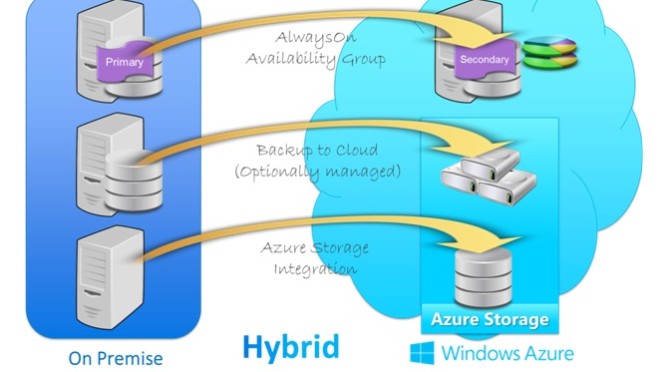
You can attach your on-premises network to your virtual machines that are operating in the public cloud as portion of a hybrid IT model.

4. Azure VM: “It’s my way or highway”
Microsoft’s new service is elastic, where you can choose the appropriate hardware configuration (small, medium, large, or extra-large) for respective VM.
You can make a custom VM functioning Windows Server or a choice of different platforms, which includes Windows Server and Linux, which you choose from the platform image gallery. There is also aQuick Create function that makes it easy to make an Azure VM by feeding basic information (DNS name, platform image, password, and location).

5: Azure Virtual Networks utilize virtual IP addresses
In an Azure Virtual Network, the virtual IP address means the public IP address utilized by external computers to join the Azure virtual machines. The external computer attaches to the virtual IP address and the suitable port (UDP or TCP) and is then readdressed by Azure (if necessary) to the suitable virtual machine.

6: You can VMs into Azure Virtual Networks –well kind of
You can “transfer” a virtual machine from on-premises network to the Azure Virtual Network. When you implement this, you don’t have to bother about static addresses that were designated to the VM because Azure will automatically make a new NIC for the VM, which will be designated a dynamic address. Even though we are talking about moving the VM, we are basically re-creating it in a fresh VM on the Azure Virtual Network.
Even if you have got a virtual machine that was made to live somewhere else on a virtual network, you still can’t just transfer it onto your Azure Virtual Network. But once again, you can make a new virtual machine on the Azure Virtual Network utilizing the .vhd file for the existing Azure VM.

7: Azure service healing restores VMs to a running state
One major advantage of running virtual machines on Azure is that it can save your VMs obtainable even when there are glitches. When Azure notices a problem with a node, it dedicatedly moves the VMs to new nodes so they are reestablished to a running and available state.
This does make the virtual machine to shut down and restart, which you’ll see mentioned in the event log. When this occurs, the MAC address, processor, and DPU ID will be altered. (This shouldn’t impact your servers, including domain controllers, which we’ll discuss about more in the next section.) The really awesome news is that when your VMs are operating on an Azure Virtual Network, the IP address of the VM does not vary when the healing process happens.
Also note that storage on data disks is stubborn, so the files kept there will not be affected by the restart and move. That’s why, with domain controllers functioning on Azure Virtual Networks, you need to save the Active Directory DIT, logs, and sysvol files on data disks. Data disks can be made to store any files other than the central operating system files. OS disks use caching, and data disks don’t; in the latter case, the data is immediately printed to everlasting storage.

8: Virtualizing domain controllers is backed
If you’ve been in the network admin occupation for some time, you probably already know that in the past, running domain controllers on VMs was glared upon. One big reason for that was that reinstating VM snapshots could easily result in discrepancies in the Active Directory database, such as unpredictable attribute values, duplicated security principles, password problems, and even schema disparity. This could create a potential terrifying consequence.
Windows Server 2012, however, introduced a novel feature, VM Generation ID, that addresses this issue. Windows Azure Virtual Networks (the general availability version, released April 16) functions on the Windows Server 2012 stack, and thus will club with this feature, although the customer preview version has not.
This means you can make domain controllers (or “move” them from an on-premises network) in the Azure Virtual Network. Note that sysprep won’t function in this scenario. You need to transfer the .vhd file for your VM into Azure storage and utilize it to create a new VM. You can also make a brand new DC on the Azure Virtual Network and allow inbound replication.

9: Azure is secure
Security is always a primary issue with any cloud application, and it becomes more significant when some or all of your infrastructure is in the public cloud. A recent Gartner report found that most customers are dissatisfied about insufficient in security-related necessities in cloud providers’ contracts.
The Azure platform’s security controls are made in from the ground up, based on Microsoft’s Security Development Lifecycle (SDL). Azure utilizes identity and access management, physical and logical isolation, and encryption to provide privacy. It also uses best security practices, such as least privilege accounts for customer software and SSL mutual verification for communications between internal components. Reliability protection is provided through the design of the Fabric VM, and extensive redundancy provides for robust availability.
For more detailed discussion of Azure’s security mechanisms, download the PDF Azure Security Overview from the Microsoft web site.

MySQL or NoSql, where to use what - Confusion resolved

MySQL or NoSQL, where to use what – Confusion resolved

For any dynamic business databases are the foundations. In current, technology oriented world, where we encounter new and revolutionary applications and tools, databases plays as the foundation platform, whether it is software-as-a-service (SAAS), e-commerce or any other services oriented tool databases are the key drive of all the data. Here’s a quick look on the differences between Relational databases and non-relational databases.

There are two types of databases relational databases and non-relational databases and the most popular of them are MySQL and NoSQL respectively.

MySQL
MySQL is the world’s most widely used open source relational database. With its ease of use, superior speed and reliability, it becomes the preferred choice of SaaS, ISV, Web, Web 2.0, Tele-communication companies and innovative IT application corporates as it enables and eliminates the key problems associated with administration, maintenance and downtime for innovative, State-of-the-art applications. Many organizations and fastest growing corporates across the globe use MySQL to reduce cost and save time fuelling their critical business systems, high volume of web portals and packaged applications including renowned industry leaders namely yahoo!, Nokia, YouTube and many fortune 500 organizations.

NoSQL
NoSQL database, also called Not Only SQL, is a method to data management and database design that’s beneficial for very large sets of distributed data. NoSQL, which includes a wide range of technologies and architectures, seeks to solve performance and scalability issues of big data performance that relational databases weren’t designed to address. NoSQL is specifically useful when an enterprise wants to access and analyze huge amounts of unstructured data or the data that is stored remotely on multiple virtual servers in the cloud.

Data Representation
MySQL represents data in tables and rows, each table contains a primary key, indicating the unique identification for each record. Tables that link to other tables do so with a primary and foreign key field.

NoSQL represents data as collections of JSON documents. A JSON document is very much like you are working with in the application layer. If you are working on javascript, it’s exactly what you’re working with. If you’re using PHP, it’s just like an associative array. If you’re using python, its just like a dictionary object.

Relationships
One of the most important and best things about MySQL and relational databases in general is JOIN operation. This allows us to accomplish queries across multiple tables. NoSQL (NoSQL) does not support joins, infact we can perform multi-dimensional data types such as arrays and even other documents. Placing one document inside another is referred to as embedding. For example, if you were to create a blog using MySQL, you would have a table for posts and a table for comments. In NoSQL you might have a single collection of posts, and an array of comments within each post.

Transactions
Another great thing about MySQL is its support for atomic transactions. The ability to contain multiple operations within a transaction and roll back the whole thing as if it were a single operation.
NoSQL does not support transactions, but single operations are atomic.

Schema Definition
MySQL requires you to define your tables and columns before you can store anything, and every row in a table must have the same columns.

One of my favorite things about NoSQL is that you don’t define the schema. You just drop in documents, and two documents within a collection don’t even need to have the same fields.

Schema Design and Normalization
In MySQL there is really isn’t much flexibility in how you structure your data if you follow normalization standards. The idea is not to prefer any specific application pattern.

In NoSQL, you have to use embedding and linking instead of joins and you don’t have transactions. This means you have to optimize your schema based on how your application will access the data. This is probably pretty scary to MySQL experts, but if you continue reading, you’ll see there is a place for both MySQL and NoSQL.

Performance
MySQL often gets blamed for poor performance. Well if you are using an ORM, performance will likely suffer. If you are using a simple database wrapper and you’ve indexed your data correctly, you’ll get good performance.

By sacrificing things like joins and providing excellent tools for performance analysis, NoSQL can perform much better than a relational database. You still need to index your data and the truth is that the vast majority applications out there don’t have enough data to notice the difference.

When should you use MySQL?
If your data structure fits nicely into tables and rows, MySQL will offer you robust and easy interaction with your data. If it’s performance that is your concern, there is a good chance you don’t really need NoSQL. Most likely, you just need to index your data properly. If you require SQL or transactions, you’ll have to stick with MySQL.

When should you use NoSQL?
If your data seems complex to model in a relational database system, or if you find yourself de-normalizing your database schema or coding around performance issues you should consider using NoSQL. If you find yourself trying to store serialized arrays or JSON objects, that’s a good sign that you are better off NoSQL. If you can’t pre-define your schema or you want to store records in the same collection that have different fields, that’s another good reason.

Conclusion
Cautious consideration should be taken when determining which database platform is more appropriate for your business model. MySQL is a relational database that is impeccable for structured data. NoSQL is a newer database structure that is more flexible than relational databases, making it more suitable for large data stores. With the growing significance of processing data, developers are progressively frustrated with the “impedance mismatch” between the object-oriented approach they use to write applications and the schema-based structure of a relational database.

NoSQL provides a much more flexible, schema-less data model that better maps to an application’s data organization and simplifies the interaction between the application and the database, resulting in less code to write, debug, and maintain.