All posts by confluoadmin

service-oriented-architecture

Service-oriented Architecture and Middleware adoption is on the rise

Adoption of SOA and middleware is on the upswing. Shift towards agile mobile application integration is driving the trend.

As per Analyst Ovum, spending in Middleware applications is expected to increase $16.3bn in 2015, an increase of 9.3% year-on-year It will primarily driven by shift towards Service-Oriented Architecture (SOA) and middleware adoption.

Service-Oriented Architecture (SOA) and Middleware appliance are software/hardware based network devices developed to address performance and integration issues. It to increase use in integration complexity, which exceed the demands of system development, implementation, design and maintenance.

Collaboration will be another area where IT departments are projected to spend on middleware. Conferring to the report, B2B integration will gain significance with the ever-increasing necessity for better customer engagement, effective management of partners and communities and rapid updating of customers and partners.

Today’s Middleware It market id split into two categories: Multi-function integrated system and single-function black box system. Middleware and SOA appliances support by providing functions such as network integration, scalability and service virtualization.

Single-function appliances system are developed for specific scenarios and cannot be reconfigured. They focus on specific functionality, such as integration or governance, messaging and security. Due to relatively low cost and effortlessness of deployment make these appliances popular amongst mid to large sized organizations, said by VP Gartner Inc.

In current scenario, organizations have much wider sets of integration obligation, as an organization you cannot deploy a big set of application anywhere without integrating with other applications and platforms. More and more enterprises are using single-function appliances as it provides a greater interoperability throughout the enterprise.
Due to high pricing Multi-functional systems have a slower adoption rate, still they have a broader use, and it has the newer offerings including reconfigured workloads and built-in enterprise pattern to optimize fast altering workloads.

One basic advantage of integrating system is that it provide exceptional support to large applications including internet banking applications or heavy traffic e-commerce, from design, development to maintenance. Other one of the most popular advantage is consolidation of multiple server machines into a single box system, thereby fixing the scalability and performance challenges and one of the prominent reason of adoption is that in today’s ever changing technology ecosystem enterprises are running out of steam with their legacy applications and hardware. It mainly relates to companies with challenging system integration requirement and complex solution portfolio.

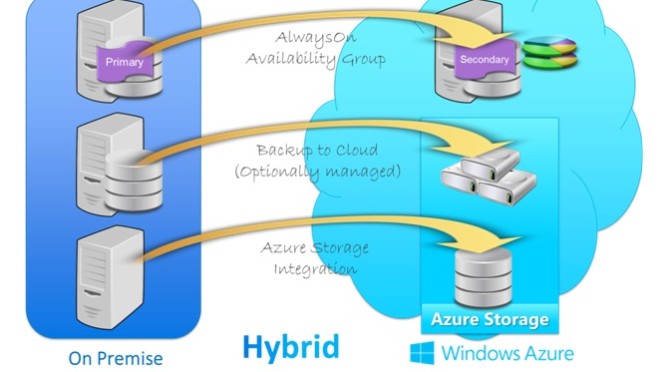
Critical steps one must consider about installing Windows Azure VMs in a hybrid IT environment

In today’s scenario where margins are getting diminished every day and the competition is getting cut throat, a majority of technology companies are migrating to the cloud. However, when you fact find the possibilities, you’ll soon find out that there are multiple ways to achieve the same and a chain of decision making that needs to be taken. Private cloud? Hybrid cloud? Public cloud?

1. Azure virtual machines function in the cloud
You can implement Azure virtual machines (VMs) in the Azure Service Infrastructure public cloud.The VMs function on Hyper-V and are saved as .vhd files. You can make new VMs from models provided by the service or make them yourself on your own locations and then upload the .vhd files to Azure.

2. On-premises network are extended by Azure Virtual network
You can attach your internal network to an Azure Virtual Network via an IPsec site-to-site VPN with an authorized VPN device and consider it like additional subnet on your network. You can create multiple Azure Virtual Networks with which your on-premises network is linked from a single point of presence. However, it doesn’t work in the reverse way– that is, you won’t be able to connect the same Azure Virtual Network with multiple on-site networks. You can’t direct connections between different Azure Virtual Networks with Azure, so if you want communication between them, you have fall back through the on-premises VPN with which they’re all connected.

3. Windows Azure Infrastructure Services permits hybrid IT
Microsoft is very serious about the infrastructure-as-a-service (IaaS) market, competing constantly with Amazon Web Services (AWS) with a pledge to match Amazon’s pricing. Windows Azure is about five years old, and the company has really invested in making an optimum performing service offering that it refers to “the most thoroughly tested product”.
Windows Azure Infrastructure Services (Azure Virtual Machines and Virtual Network) was introduced on April 16, and you can use it to make a hybrid cloud that performs for your organization. Here are some thoughts to keep in mind when installing this hybrid model.
You can attach your on-premises network to your virtual machines that are operating in the public cloud as portion of a hybrid IT model.

4. Azure VM: “It’s my way or highway”
Microsoft’s new service is elastic, where you can choose the appropriate hardware configuration (small, medium, large, or extra-large) for respective VM.
You can make a custom VM functioning Windows Server or a choice of different platforms, which includes Windows Server and Linux, which you choose from the platform image gallery. There is also aQuick Create function that makes it easy to make an Azure VM by feeding basic information (DNS name, platform image, password, and location).

5: Azure Virtual Networks utilize virtual IP addresses
In an Azure Virtual Network, the virtual IP address means the public IP address utilized by external computers to join the Azure virtual machines. The external computer attaches to the virtual IP address and the suitable port (UDP or TCP) and is then readdressed by Azure (if necessary) to the suitable virtual machine.

6: You can VMs into Azure Virtual Networks –well kind of
You can “transfer” a virtual machine from on-premises network to the Azure Virtual Network. When you implement this, you don’t have to bother about static addresses that were designated to the VM because Azure will automatically make a new NIC for the VM, which will be designated a dynamic address. Even though we are talking about moving the VM, we are basically re-creating it in a fresh VM on the Azure Virtual Network.
Even if you have got a virtual machine that was made to live somewhere else on a virtual network, you still can’t just transfer it onto your Azure Virtual Network. But once again, you can make a new virtual machine on the Azure Virtual Network utilizing the .vhd file for the existing Azure VM.

7: Azure service healing restores VMs to a running state
One major advantage of running virtual machines on Azure is that it can save your VMs obtainable even when there are glitches. When Azure notices a problem with a node, it dedicatedly moves the VMs to new nodes so they are reestablished to a running and available state.
This does make the virtual machine to shut down and restart, which you’ll see mentioned in the event log. When this occurs, the MAC address, processor, and DPU ID will be altered. (This shouldn’t impact your servers, including domain controllers, which we’ll discuss about more in the next section.) The really awesome news is that when your VMs are operating on an Azure Virtual Network, the IP address of the VM does not vary when the healing process happens.
Also note that storage on data disks is stubborn, so the files kept there will not be affected by the restart and move. That’s why, with domain controllers functioning on Azure Virtual Networks, you need to save the Active Directory DIT, logs, and sysvol files on data disks. Data disks can be made to store any files other than the central operating system files. OS disks use caching, and data disks don’t; in the latter case, the data is immediately printed to everlasting storage.

8: Virtualizing domain controllers is backed
If you’ve been in the network admin occupation for some time, you probably already know that in the past, running domain controllers on VMs was glared upon. One big reason for that was that reinstating VM snapshots could easily result in discrepancies in the Active Directory database, such as unpredictable attribute values, duplicated security principles, password problems, and even schema disparity. This could create a potential terrifying consequence.
Windows Server 2012, however, introduced a novel feature, VM Generation ID, that addresses this issue. Windows Azure Virtual Networks (the general availability version, released April 16) functions on the Windows Server 2012 stack, and thus will club with this feature, although the customer preview version has not.
This means you can make domain controllers (or “move” them from an on-premises network) in the Azure Virtual Network. Note that sysprep won’t function in this scenario. You need to transfer the .vhd file for your VM into Azure storage and utilize it to create a new VM. You can also make a brand new DC on the Azure Virtual Network and allow inbound replication.

9: Azure is secure
Security is always a primary issue with any cloud application, and it becomes more significant when some or all of your infrastructure is in the public cloud. A recent Gartner report found that most customers are dissatisfied about insufficient in security-related necessities in cloud providers’ contracts.
The Azure platform’s security controls are made in from the ground up, based on Microsoft’s Security Development Lifecycle (SDL). Azure utilizes identity and access management, physical and logical isolation, and encryption to provide privacy. It also uses best security practices, such as least privilege accounts for customer software and SSL mutual verification for communications between internal components. Reliability protection is provided through the design of the Fabric VM, and extensive redundancy provides for robust availability.
For more detailed discussion of Azure’s security mechanisms, download the PDF Azure Security Overview from the Microsoft web site.

MySQL or NoSql, where to use what - Confusion resolved

MySQL or NoSQL, where to use what – Confusion resolved

For any dynamic business databases are the foundations. In current, technology oriented world, where we encounter new and revolutionary applications and tools, databases plays as the foundation platform, whether it is software-as-a-service (SAAS), e-commerce or any other services oriented tool databases are the key drive of all the data. Here’s a quick look on the differences between Relational databases and non-relational databases.

There are two types of databases relational databases and non-relational databases and the most popular of them are MySQL and NoSQL respectively.

MySQL
MySQL is the world’s most widely used open source relational database. With its ease of use, superior speed and reliability, it becomes the preferred choice of SaaS, ISV, Web, Web 2.0, Tele-communication companies and innovative IT application corporates as it enables and eliminates the key problems associated with administration, maintenance and downtime for innovative, State-of-the-art applications. Many organizations and fastest growing corporates across the globe use MySQL to reduce cost and save time fuelling their critical business systems, high volume of web portals and packaged applications including renowned industry leaders namely yahoo!, Nokia, YouTube and many fortune 500 organizations.

NoSQL
NoSQL database, also called Not Only SQL, is a method to data management and database design that’s beneficial for very large sets of distributed data. NoSQL, which includes a wide range of technologies and architectures, seeks to solve performance and scalability issues of big data performance that relational databases weren’t designed to address. NoSQL is specifically useful when an enterprise wants to access and analyze huge amounts of unstructured data or the data that is stored remotely on multiple virtual servers in the cloud.

Data Representation
MySQL represents data in tables and rows, each table contains a primary key, indicating the unique identification for each record. Tables that link to other tables do so with a primary and foreign key field.

NoSQL represents data as collections of JSON documents. A JSON document is very much like you are working with in the application layer. If you are working on javascript, it’s exactly what you’re working with. If you’re using PHP, it’s just like an associative array. If you’re using python, its just like a dictionary object.

Relationships
One of the most important and best things about MySQL and relational databases in general is JOIN operation. This allows us to accomplish queries across multiple tables. NoSQL (NoSQL) does not support joins, infact we can perform multi-dimensional data types such as arrays and even other documents. Placing one document inside another is referred to as embedding. For example, if you were to create a blog using MySQL, you would have a table for posts and a table for comments. In NoSQL you might have a single collection of posts, and an array of comments within each post.

Transactions
Another great thing about MySQL is its support for atomic transactions. The ability to contain multiple operations within a transaction and roll back the whole thing as if it were a single operation.
NoSQL does not support transactions, but single operations are atomic.

Schema Definition
MySQL requires you to define your tables and columns before you can store anything, and every row in a table must have the same columns.

One of my favorite things about NoSQL is that you don’t define the schema. You just drop in documents, and two documents within a collection don’t even need to have the same fields.

Schema Design and Normalization
In MySQL there is really isn’t much flexibility in how you structure your data if you follow normalization standards. The idea is not to prefer any specific application pattern.

In NoSQL, you have to use embedding and linking instead of joins and you don’t have transactions. This means you have to optimize your schema based on how your application will access the data. This is probably pretty scary to MySQL experts, but if you continue reading, you’ll see there is a place for both MySQL and NoSQL.

Performance
MySQL often gets blamed for poor performance. Well if you are using an ORM, performance will likely suffer. If you are using a simple database wrapper and you’ve indexed your data correctly, you’ll get good performance.

By sacrificing things like joins and providing excellent tools for performance analysis, NoSQL can perform much better than a relational database. You still need to index your data and the truth is that the vast majority applications out there don’t have enough data to notice the difference.

When should you use MySQL?
If your data structure fits nicely into tables and rows, MySQL will offer you robust and easy interaction with your data. If it’s performance that is your concern, there is a good chance you don’t really need NoSQL. Most likely, you just need to index your data properly. If you require SQL or transactions, you’ll have to stick with MySQL.

When should you use NoSQL?
If your data seems complex to model in a relational database system, or if you find yourself de-normalizing your database schema or coding around performance issues you should consider using NoSQL. If you find yourself trying to store serialized arrays or JSON objects, that’s a good sign that you are better off NoSQL. If you can’t pre-define your schema or you want to store records in the same collection that have different fields, that’s another good reason.

Conclusion
Cautious consideration should be taken when determining which database platform is more appropriate for your business model. MySQL is a relational database that is impeccable for structured data. NoSQL is a newer database structure that is more flexible than relational databases, making it more suitable for large data stores. With the growing significance of processing data, developers are progressively frustrated with the “impedance mismatch” between the object-oriented approach they use to write applications and the schema-based structure of a relational database.

NoSQL provides a much more flexible, schema-less data model that better maps to an application’s data organization and simplifies the interaction between the application and the database, resulting in less code to write, debug, and maintain.

Microsoft Azure

Microsoft Azure: slow and steady wins the race

Someone recently wrote an interesting article envisaging the end of Amazon’s supremacy of the cloud computing market, and finished, “it’s unexpectedly a good time to be Google or Microsoft in the cloud computing war zone”.

However, if one looks at the scenario carefully, it is quite evident that Microsoft is leading the pack.

Primarily, the price war. Google and Microsoft relatively share a common price cutting strategy, both have lucrative core businesses that they can utilize to support a price war in cloud infrastructure, willing to lose some money for long-term monetary gains.

While Amazon’s support may be awful (personal view), Google and Microsoft and their respective partners do a good enough job of supporting clienteles on their stack. This historically was not the case, Google used to consider support as an expensive investment. However, in case of Google apps it has stepped up considerably.

Then there are the niche cloud providers who do an improved job than the bigger folks at delivering infrastructure-as-a-service for respective verticals, however, when you at the bigger piece of the pie to full software-as-a-service applications, office 365 gives Microsoft an edge. On the other hand, Google has been penetrating into smaller businesses with Google Apps for a decade now. Microsoft on the other hand remains the default amongst the biggest and the most profitable customers. Like a recent research from Dan Frommer showed, only a single amongst the top 50 Fortune companies uses Google Apps.

However, it has been analyzed that once companies get to $200,000 per month of expenditure on cloud infrastructure, it’s relatively less expensive to make one’s own data centers.

Microsoft scores in one more point. Google’s main revenue channel is through the sales of their online advertisements, and it has advantageously high operating margins, that of around 30%.

Though Azure offers really low margins than on-site Window Servers, its essential- customers are shifting workloads to the cloud, and Microsoft requires an economical offering there to keep them on Microsoft’s stack so they continue to buy other products from Microsoft. Plus, future 0n-premise Microsoft infrastructure customers can be the ones who are using Azure today.

So to speak, Google Cloud Engine and Microsoft Azure both are lowering profit margins of their parent entity. However, Azure has clear cut goals defined, whereas with Cloud engine that does not seem to be the case.

But, the atmosphere is pretty dynamic and can always change. Amazon can overcome it’s flaws, Google could really emphasize on products other than ads, and Microsoft could lose out on it’s initial momentum by pricing policies which are short-sighted or unnecessary feature changes.

To summarize, presently Microsoft’s chances are pretty good. No wonder the cloud guy in the organization, is in the driver’s seat.

Amazon Web Service’s

So how big is Amazon Web Services cloud computing division set against Microsoft and Google?

It’s tough to make a comprehensive apples-to-apples comparison because none of these companies are particularly transparent when dispensing information about the financial health of their operations.

However, a latest report from New-Hampshire based organization Technology Business research projects Amazon’s cloud revenue at $4.7 billion and counting, this year. TBR estimates Microsoft’s public cloud IaaS revenue at $156 million and $66 million of Google. If these estimates are for real than Amazon’s cloud revenue is around 30 times more than Microsoft’s.

Jillian Mirandi who penned the report, does have a caution. “Google Compute Engine was generally offered in December 2013 and Microsoft Azure IaaS in April 2013, giving AWS a six year lead. However, even with a lead of 6 years, lies the dramatic difference. This, is excluding the lucrative SaaS app market, and only pertains to the IaaS, compute, network, and storage on-demand market.

The numbers surely are impervious. Earlier this week Microsoft’s CEO Satya Nadella said in a press conference about announcing a new private Cloud Platform (CPS), that Microsoft’s cloud has a yearly revenue rate of $4.4 billion. Including Microsoft Office 365 Saas apps, such as Dynamics, but also Azure.

In reports released regarding 3rd quarter earnings, all three companies were modest about respective cloud services offered. Microsoft claimed that its cloud has grown 123%. Amazon, in the meantime said that it relished 90% year-over-year usage growth. Companies can use numbers to convey different messages, we know that. Amazon famously hides its revenues behind the blanket of an “other” group in its earnings reports, which contain AWS revenues and “other” revenues as well not linked to eCommerce.

Till the time these organizations are more transparent about their financial figures all we can do is speculate. But based on the estimates that we discussed, when public cloud is concerned IaaS revenue, Amazon appears to be the leader.

google-drive

Google Drive!! Will it get the throne for end user cloud storage

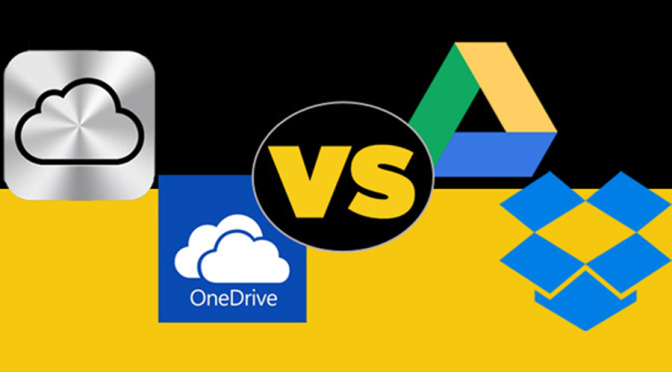
There is around 1 exabyte worth of data being kept in the cloud. That’s 1 million gigabytes and more. No wonder all the prominent names are continuously evolving their services, hoping to retain users and entice new ones. With the announcement of new pricing for its iCloud service, Apple wishes to keep the iOS faithful backed up universally, and possibly tempt more folks to its side. But Apple’s competition with Dropbox, Google and Microsoft, just to name a few, is still imminent.

Therefore, the “billion dollar question” which cloud is the best? Here’s our pricing breakdown.

Pricing & Features
To assist you choose the right cloud service, let’s begin by investigating the fundamentals of what each service offers. Precisely what do you get for your money?
google-blog

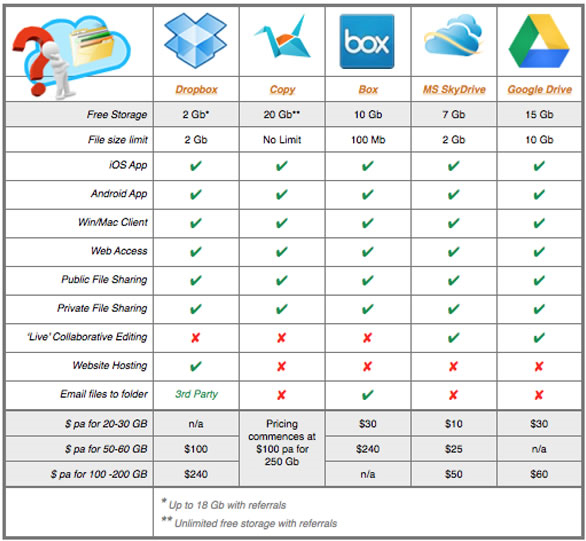
If free is the appropriate value for your online storing needs, you’re best choice are Google Drive or Microsoft OneDrive. Dropbox could be awesome — 16GB knocks down everyone — but to get all that storage space you have to refer 28 other people to try Dropbox.

Apple gives a 20GB choice of cloud storage. So if that is your sweet spot it will get you dearer by $0.99 per month. This offer is given free by Microsoft with an Office 365 subscription, but that costs minimum $6.99 per month for an individual. With the subsequent tier up — 50GB — Apple gets some rivalry from Microsoft. However, Microsoft’s deal is so much cheaper at $25.

Google, Microsoft and Dropbox all contest in the 100GB space, with the best deal being offered by Google Drive at $1.99 per month. However, for 200GB you’ll acquire the best price per gigabyte from Apple’s new iCloud pricing arrangement, which will cost you $3.99 per month. In this size range Google and Dropbox do not offer any option.

Once you reach the 1TB range, you get much more business-centric plans. Google offers 1TB for 9.99 a month. Onedrive (coming soon) and Dropbox on the other hand charge on the basis of respective users at $2.50 and $15 per user. Apple is yet to announce a price for its 1TB option.

Bottom Line
Google Drive is presently the most popular service (Everybody has a Gmail account right?) and makes producing and sharing across every platform a cakewalk. Microsoft is trying to get more grip for OneDrive. With the announcement and addition with Office 365 you can bet the company will be diverting attention towards their cloud services. Google Drive and OneDrive’s integration with productivity software separates it from Dropbox.

Dropbox is the easiest cloud service to use and platform agnostic, as its only purpose is easy-to-use sharing and storage. Apple is taking a rather different path with iCloud, merging behind-the-scenes media and document syncing through multiple devices with an upcoming iCloud Drive option that will offer users the drag-and-drop and organization features competitors already offer.


Operational Excellence services - Confluo

Axway Develops Operational Intelligence Competencies

Axway, a pioneer in governing the flow of data, launched Axway Decision Insight, better known as Systar Tornnado. Decision Insight enables business owners to proactively manage operational objective of business, which encompass, meeting service level agreements, lower the operational cost and improve customer experience.

Globally, across organizations, staff member achievements are measured as per strategic customer demands, compliance obligations and customer requirement. Decision Insight by Axway, provides, actionable intelligent, predict insights and also situation awareness as per the right context to the right person at the right time.

As per the leading market research firm-Gartner, by 2017, organizations using predictive business performance metrics will increase their profitability by 20. It has proven and robust dashboards and alert features for all operational intelligence category, including risk, compliance, process, business performance, client and business. It enables better decision making by business users in real-time.

Axway, Decision Insight enables a wide spectrum of solutions to be implemented on it, with rapidity, flexibility and each solution can be customized as per the business context. Decision Insight by Axway offers business users innovative attributes includes fast and smart decision making in real-time, which makes it a powerful tool to cater operational excellence challenges.

  • Personalized information Insight – It is a comprehensive operational intelligence tool, which enables the business analysts, business users and other business stakeholders to get a customized view of their information with a single user interface for better consequence of business decisions in real time.
  • Efficient time to value usage with high flexibility – It builds a production-ready environment that can support steady improvements to important business applications. With an open source platform, non-technical users can configure and create applications. With lean configuration process, businesses can configure new changes in the dashboards within hours.
  • Time based analytics – It provides a production ready ecosystem that can aid continuous improvement to vital business application, through its temporal analytics, temporal data structure and bi-temporal indexing and determine the sign of danger based on past business information.
  • Lower the Total-cost-of-Ownership – This platform is completely self – contained, designed on JAVA and it does not require any additional operating software like web servers, database and other applications, thus enable businesses to achieve operational excellence with lowered cost.

In the today’s competitive world, where operational excellence is a vital value proposition for any business, consistent operational information helps businesses to proactively manage business-critical operation and reduce risks. Business users can use both real-time and past historical operational data to achieve operational objectives and ever changing organization-wide goals.

So What Makes a Good Process?

So What Makes a Good Process?

So what is a good process? This was the first question that came across my mind when I set upon the task of actually drafting a process. Right from the days when I had started of as a software developer to the realm when I have been a project manager for some time, I have come to terms with one reality that development teams should not and they cannot slavishly follow a predefined process, instead, the key is to continually adjust the process as you go by reflecting on what you’re learning, what works, and what doesn’t. So how do we come across or define a good process? Based on my experience I feel that there are some pre-requisites for a good process, which are:

1. A “Good” Process allows you to be fast — without having to reinvent the wheel! I am going to claim, what we all know but seldom admit, –that the fastest way to create software is not to develop anything yourself, but to reuse something that already works. This approach is not just very fast; it is also cheap. It delivers software that works. In practice, in many situations you may still need to develop something new, at the least the glue between the components that you can reuse. We don’t develop our own operating systems, database systems, programming languages, and programming environments any more. We usually start with a software platform and some middleware as a base — not much more. However, much more can be reused:

— You shouldn’t have to reinvent a process. Instead, you should use a well-proven process that is designed to be reused. This is what we call a process framework.

— You shouldn’t have to reinvent the same software over and over again. You should use a process that helps you harvest components and incorporate existing components — legacy systems or other reusable components — into your design. Of course, the process would come with appropriate tools to do so.

2. A “Good” Process allows you to learn as you go — without slowing down the project: Developing software has never been as hard as it is today. As a developer, you need to have a knowledge base that is larger than ever before. You need to know about operating systems, database management systems, programming languages and environments, system software, middleware, patterns, object-oriented design, component-based development, and distributed systems. You also need to know a software process, a modeling language, and all kinds of tools. And if you succeed in learning something, you can be sure it will soon change. Change is the famous constant in the software domain! There is simply no way you will be able to learn all this before you start working on a project. You have to learn a little before, but most of it you will need to learn as we go.

3. A “Good” Process should empower you to focus on creativity: In every project a large portion of the work done by developers is not genuinely creative — it is tedious, routine work that we should try to automate. The problem is that the creative and the routine work are interwoven in microsteps, with each such step only lasting from maybe tens of seconds to tens of minutes. Since these two kinds of activities are interleaved, the developers may still have the feeling of being creative, but fundamentally they are not. Some of you would probably argue that, in fact, you don’t do the unnecessary work. You focus on solving the business problem and ignore much of the other work that does not deliver business value. This is, of course, partly true. However, even in projects where the focus is on code, people have different approaches to good coding standards. What most people thought was good code some years ago is considered bad code today. Thus people spend time on arguing about these things. With a strong, good leader, these problems may be smaller. However, most teams won’t have such a leader. Aside from process issues, we also spend considerable time on many other small, technical issues. For instance, if you want to apply a pattern, there are many small steps you have to go through before you have instantiated the pattern. These small steps could, with proper tooling, be reduced to almost a single step.

4. A “Good” Process uses tools to do more by doing less: Whatever you do, in order to be efficient you need good tools. Good tools are tools that are developed to work integrally with your process. The process and the tools go together. For instance, in examples taken from another world, if you want your carpenter to drive nails in a wall, he needs a hammer, not a screwdriver; if you want your baby to eat on his own, give him a spoon, not a knife. The same goes for software. If the software community ever is going to be more efficient — that is, be able to rapidly develop high-quality software — then we need tools to help us do more by doing less. I agree with the idea that we want a process that is very light. In fact, I want a much lighter process than I have heard people speak about. It will be light because tools will do the job — you will be doing more by doing less.

DO WE NEED ANOTHER SOFTWARE

Do We Need Another Software Development Methodology?

The answer is YES, we do need one. Let me start by asking the mother of all question in software development, and that is why do software projects fail? Most large-scale software projects fail, and this phenomenon is not restricted to large scale projects only. Failures range from the worst-case scenario of projects that are not completed, to projects that are over budget or that fall short of expected goals and objectives. The larger the project, the more likely it is to go belly up, and this often leads to a costly washout for an organization. Even though each less-than-successful project has its own unique causes, I have pinpointed five of the primary factors that underlie most problems:
1. Poor communication
2. Incomplete requirements and specifications
3. Scope issues
4. Inadequate testing
5. Integration

Problem One: Poor communication
One of the main reason projects fail is unclear, inadequate or inconsistent communication between stakeholders. Standard development methods do not include methodologies that support the ongoing and meaningful sharing of information between all project participants. Business users, technical management, outsourced services providers, and individual programmers are often isolated from each other.

Problem Two: Incomplete requirements and specifications
Traditional waterfall development begins with the creation of a comprehensive requirements document. This often massive guideline is designed to provide the blueprint for the entire project. The problem is that, in every project that lasts more than a couple of weeks, specifications will unavoidably change over time. Business requirements change. New aspects of the project come to light. What seemed workable on paper proves untenable in implementation. Despite the almost universal need for changes in requirements and specifications over the course of a project, traditional methodologies do a very poor job in systematically integrating such changes.

Problem Three: Scope issues
One of the most common areas of contention in software projects is “scope creep,” which causes discrepancies in both cost and delivery time. This is not surprising—you would need a crystal ball to anticipate the changes that may be needed in the life of a large-scale software development project whose entire scope can range in months or years. It has been stated that when estimating large projects, you can either be lucky or wrong. Unfortunately, most estimates aren’t very lucky.

Problem Four: Inadequate testing
Traditional development methods save testing to the final phase of a project. This is very problematic because issues with core architecture may not be exposed until a project is almost completed. At that time, correcting such fundamental problems can be very costly or may even require an almost total revamping of the code base. Another factor that adds to testing issues in traditional development is that testing is often under funded and constrained by time. By the end of the project there is usually tremendous time pressure to deliver the completed software, so the first roll-out of the new software is often an unofficial beta test.

Problem Five: Integration
Large projects using traditional development methodologies often fall apart during the integration process. It is often the case that different teams of programmers, who may be geographically dispersed, work in relative isolation on individual parts of the project for long stretches of time. As they finish their work, they typically turn over the code to the project manager who then assigns it to a new team that attempts to integrate the disparate components and make them all work together. Since there had been no consistent communication between the teams during the development process, there are often significant problems at this stage as different interpretations of the requirements or their implementation becomes apparent.

WHY WATERFALL OR ITS VARIATIONS

Why Waterfall Or Its Variations Do Not Suit Us? Predictive Vs. Adaptive

The waterfall model is the most predictive of the methodologies, stepping through requirements capture, analysis, design, coding, and testing in a strict, pre-planned sequence. Progress is generally measured in terms of deliverable artifacts – requirement specifications, design documents, test plans, code reviews and the like. The waterfall model can result in a substantial integration and testing effort toward the end of the cycle, a time period typically extending from several months to several years. The size and difficulty of this integration and testing effort is one cause of waterfall project failure.

Though there have been several variations of this methodologies preached for development of software in a planned and predictive manner, like spiral or iterative development, but I have seen most software development is a chaotic activity, often characterized by the phrase “code and fix”. The software is written without much of an underlying plan, and the design of the system is cobbled together from many short term decisions. This actually works pretty well as the system is small, but as the system grows it becomes increasingly difficult to add new features to the system. Furthermore bugs become increasingly prevalent and increasingly difficult to fix. A typical sign of such a system is a long test phase after the system is “feature complete”. Such a long test phase plays havoc with schedules as testing and debugging is impossible to schedule.

Reason 1: We need to separate design from construction, and this does suits us
Because the approach for software engineering methodologies looks like this: we want a predictable schedule that can use people with lower skills. To do this we must separate design from construction. Therefore we need to figure out how to do the design for software so that the construction can be straightforward once the planning is done. So what form does this plan take? For many, this is the role of design notations such as the UML. If we can make all the significant decisions using the UML, we can build a construction plan and then hand these designs off to coders as a construction activity. But here lies the crucial question. Can you get a design that is capable of turning the coding into a predictable construction activity? And if so, is cost of doing this sufficiently small to make this approach worthwhile?

All of this brings a few questions to mind. The first is the matter of how difficult it is to get a UML-like design into a state that it can be handed over to programmers. The problem with a UML-like design is that it can look very good on paper, yet be seriously flawed when you actually have to program the thing. The only checking we can do of UML-like diagrams is peer review. While this is helpful it leads to errors in the design that are often only uncovered during coding and testing. Even skilled designers, such as I consider myself to be, are often surprised when we turn such a design into software. Another issue is that of comparative cost. When you build a bridge, the cost of the design effort is about 10% of the job, with the rest being construction. In software the amount of time spent in coding is much, much less experts suggests that for a large project, only 15% of the project is code and unit test, an almost perfect reversal of the bridge building ratios. Even if you lump in all testing as part of construction, then design is still 50% of the work. This raises an important question about the nature of design in software compared to its role in other branches of engineering.

These kinds of questions led many like me to suggest that in fact the source code is a design document and that the construction phase is actually the use of the compiler and linker. Indeed anything that you can treat as construction can and should be automated.

This thinking leads to some important conclusions:

— In software: construction is so cheap as to be free

— In software all the effort is design, and thus requires creative and talented people

— Creative processes are not easily planned, and so predictability may well be an impossible target

— We should be very wary of the traditional engineering metaphor for building software. It’s a different kind of activity and requires a different process

Reason 2: The Unpredictability of Requirements
There’s a refrain I’ve heard on every problem project I’ve run into. The developers come to me and say “the problem with this project is that the requirements are always changing”. The thing I find surprising about this situation is that anyone is surprised by it. In building business software requirements changes are the norm, the question is what we do about it. One route is to treat changing requirements as the result of poor requirements engineering. The idea behind requirements engineering is to get a fully understood picture of the requirements before you begin building the software, get a customer sign-off to these requirements, and then set up procedures that limit requirements changes after the sign-off.

One problem with this is that just trying to understand the options for requirements is tough. It’s even tougher because the development organization usually doesn’t provide cost information on the requirements. You end up being in the situation where you may have some desire for a sun roof on your car, but the salesman can’t tell you if it adds $10 to the cost of the car, or $10,000. Without much idea of the cost, how can you figure out whether you want to pay for that sunroof? Estimation is hard for many reasons. Part of it is that software development is a design activity, and thus hard to plan and cost. Part of it is that the basic materials keep changing rapidly. Part of it is that so much depends on which individual people are involved, and individuals are hard to predict and quantify. Software’s intangible nature also cuts in. It’s very difficult to see what value a software feature has until you use it for real. Only when you use an early version of some software do you really begin to understand what features are valuable and what parts are not.

This leads to the ironic point that people expect that requirements should be changeable. After all software is supposed to be soft. So not just are requirements changeable, they ought to be changeable. It takes a lot of energy to get customers of software to fix requirements. It’s even worse if they’ve ever dabbled in software development themselves, because then they “know” that software is easy to change. But even if you could settle all that and really could get an accurate and stable set of requirements you’re probably still doomed. In today’s economy the fundamental business forces are changing the value of software features too rapidly. What might be a good set of requirements now, is not a good set in six months time. Even if the customers can fix their requirements, the business world isn’t going to stop for them. And many changes in the business world are completely unpredictable: anyone who says otherwise is either lying, or has already made a billion on stock market trading.

Everything else in software development depends on the requirements. If you cannot get stable requirements you cannot get a predictable plan.

Reason 3: Is Predictability Impossible?
In general, No. There are some software developments where predictability is possible. Organizations such as NASA’s space shuttle software group are a prime example of where software development can be predictable. It requires a lot of ceremony, plenty of time, a large team, and stable requirements. There are projects out there that are space shuttles. However I don’t think much business software fits into that category. For this you need a different kind of process. One of the big dangers is to pretend that you can follow a predictable process when you can’t. People who work on methodology are not very good at identifying boundary conditions: the places where the methodology passes from appropriate in inappropriate. Most methodologists want their methodologies to be usable by everyone, so they don’t understand nor publicize their boundary conditions. This leads to people using a methodology in the wrong circumstances, such as using a predictable methodology in an unpredictable situation.

There’s a strong temptation to do that. Predictability is a very desirable property. However if you believe you can be predictable when you can’t, it leads to situations where people build a plan early on, then don’t properly handle the situation where the plan falls apart. You see the plan and reality slowly drifting apart. For a long time you can pretend that the plan is still valid. But at some point the drift becomes too much and the plan falls apart. Usually the fall is painful. So if you are in a situation that isn’t predictable you can’t use a predictive methodology. That’s a hard blow. It means that many of the models for controlling projects, many of the models for the whole customer relationship, just aren’t true any more. The benefits of predictability are so great, it’s difficult to let them go. Like so many problems the hardest part is simply realizing that the problem exists.

Reason 4: The Adaptive Customer
This kind of adaptive process requires a different kind of relationship with a customer than the ones that are often considered, particularly when development is done by a separate firm. When you hire a separate firm to do software development, most customers would prefer a fixed-price contract. Tell the developers what they want, ask for bids, accept a bid, and then the onus is on the development organization to build the software. A fixed price contract requires stable requirements and hence a predictive process. Adaptive processes and unstable requirements imply you cannot work with the usual notion of fixed-price. Trying to fit a fixed price model to an adaptive process ends up in a very painful explosion. The nasty part of this explosion is that the customer gets hurt every bit as much as the software development company. After all the customer wouldn’t be wanting some software unless their business needed it. If they don’t get it their business suffers. So even if they pay the development company nothing, they still lose. Indeed they lose more than they would pay for the software (why would they pay for the software if the business value of that software were less?). So there’s dangers for both sides in signing the traditional fixed price contract in conditions where a predictive process cannot be used. This means that the customer has to work differently. This doesn’t mean that you can’t fix a budget for software up-front. What it does mean is that you cannot fix time, price and scope.